MCP server
CloudPress runs a Model Context Protocol (MCP) server so AI assistants can manage your sites, DNS, domains, and more on your behalf. It is a stateless, OAuth-only, JSON-RPC 2.0 endpoint at POST /mcp on your brand host, exposing a curated subset of the REST API as MCP tools — broad read access plus a small set of safe writes.
Connecting a client
Modern MCP clients connect to CloudPress directly over remote HTTP — no local bridge or config file required. Point your client at the CloudPress MCP endpoint and authorize in the browser.
Quick start
| Transport | Streamable HTTP (remote) |
| URL | https://my.cloudpress.com/mcp |
| Headers / credentials | None — authentication happens after setup via the OAuth browser flow |
There are no headers, tokens, or environment variables to configure up front. After you add the server, your client prompts you to sign in to CloudPress and authorize access; the token is obtained and stored for you.
Use your own brand host
Replace my.cloudpress.com with your CloudPress brand hostname. White-label brands each have their own host (for example brand.example.com). The /mcp URL must match the brand you authorize against — access tokens are locked to the brand they were issued under (see Authentication below).
Claude (desktop)
Claude supports CloudPress as a custom connector — no manual configuration needed. See Anthropic's Get started with custom connectors using remote MCP for full details.
- Open Customize → Connectors → Add custom connector.
- Give it a Name (for example,
CloudPress). - Set the Remote MCP server URL to
https://my.cloudpress.com/mcp. - Click Add.
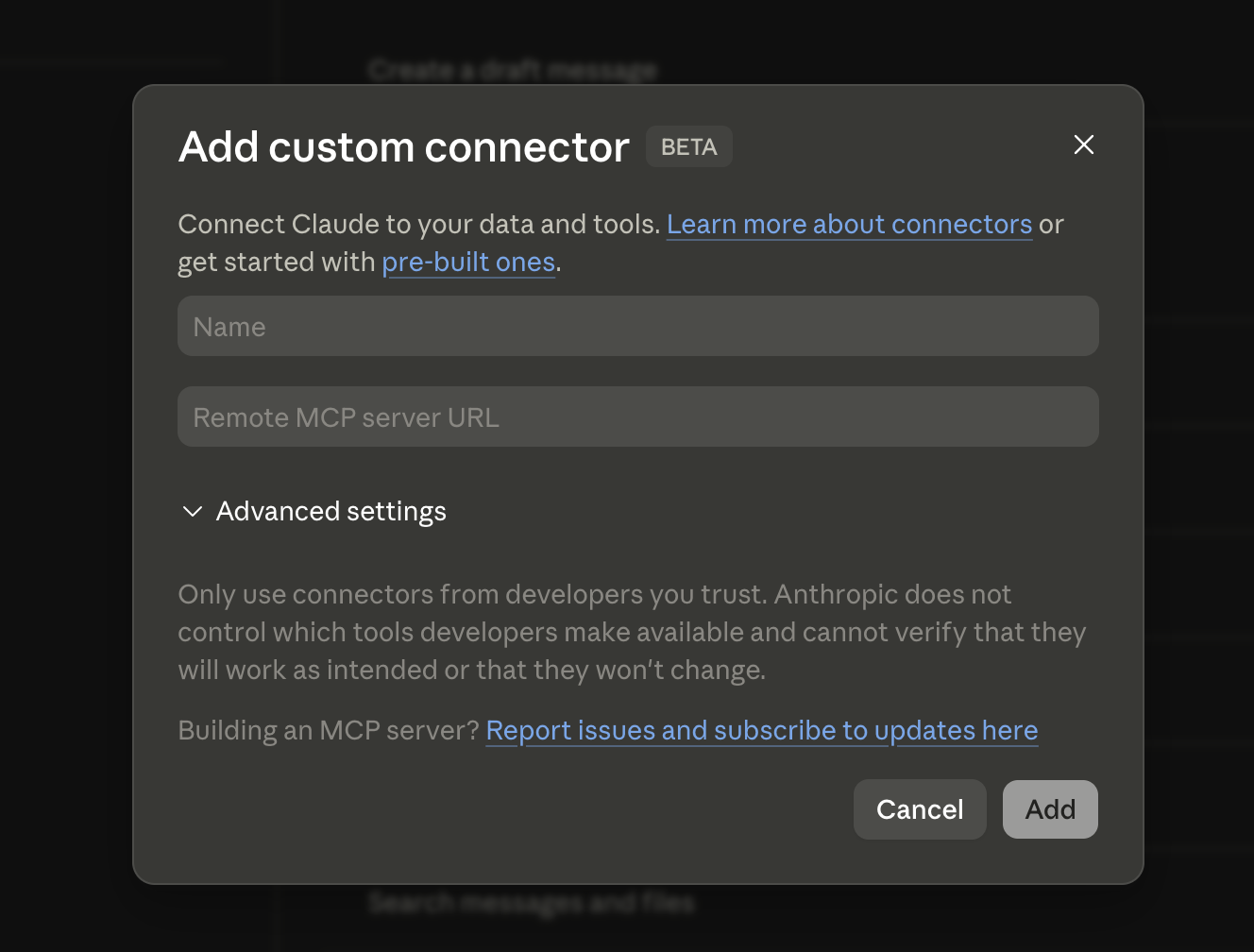
Once added, Claude prompts you to authenticate with your CloudPress account to complete the connection.
OpenAI Codex (desktop)
- Open Settings → MCP Servers → Add Server.
- Enter the server URL
https://my.cloudpress.com/mcp. No additional fields are needed beyond the URL. - Save.
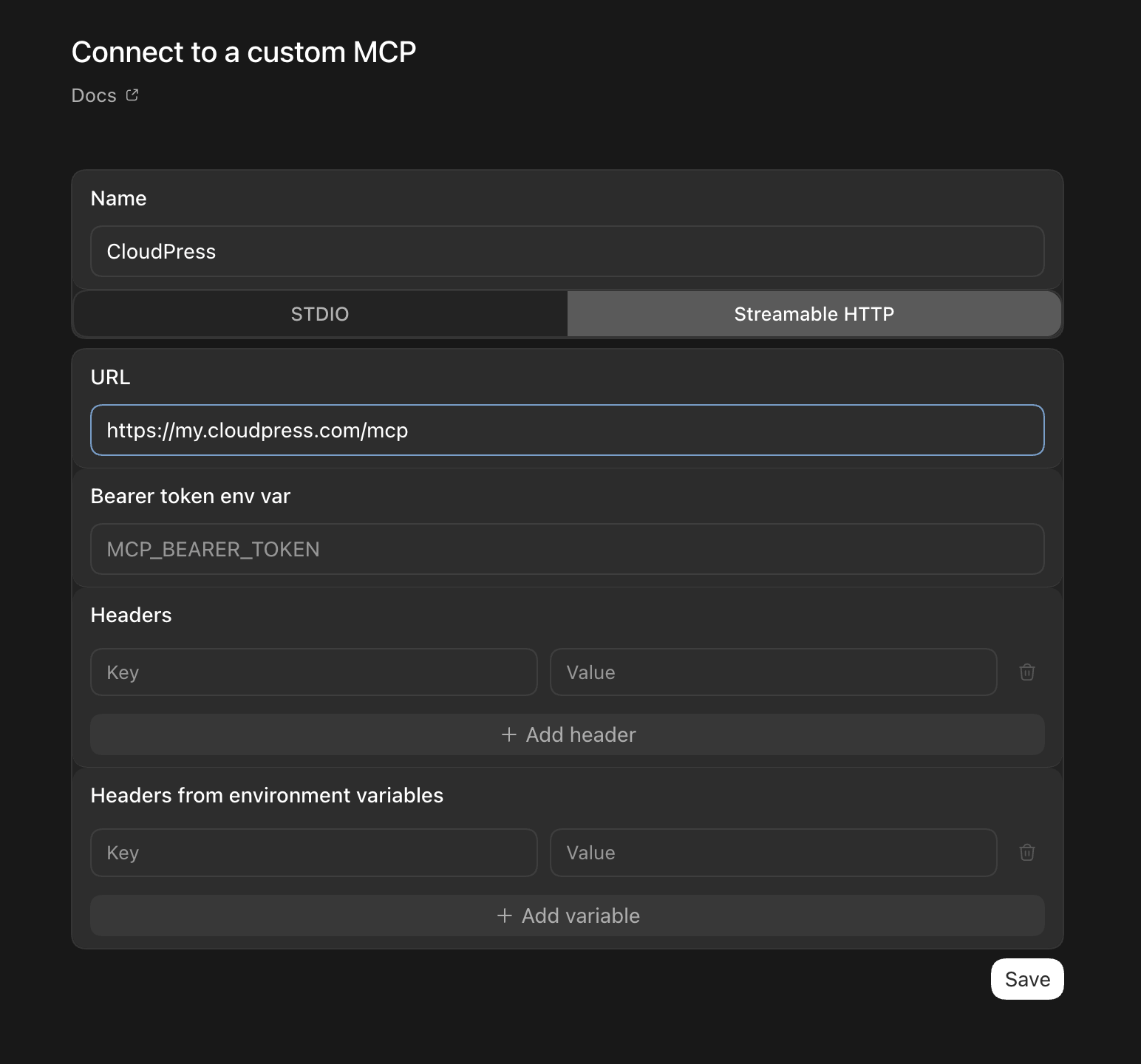
After saving, Codex prompts you to authenticate with your CloudPress account to complete the connection.
Transport
POST /mcpcarries the JSON-RPC request.GET,PUT,PATCH, andDELETEreturn405 Method Not Allowed.- The request body is a single JSON-RPC object. Batch arrays are rejected (
-32600); malformed JSON returns-32700(parse error). - A notification (a request with no
id, such asnotifications/initialized) returns202with an empty body. - CORS is enabled for
/mcp(origins*, methodsGET/POST/OPTIONS). A browserOrigin, when present, must match the request host or the request is rejected403(Origin not allowed); non-browser clients send noOrigin, which is allowed. - The optional
MCP-Protocol-Versionheader, if sent, must be one of2025-06-18,2025-03-26, or2024-11-05, otherwise400. - Rate limit: 6000 requests / 10 minutes, keyed per OAuth token.
Authentication
The MCP server accepts only OAuth 2.1 access tokens (session and API-key credentials are refused — see OAuth 2.1). Beyond the normal OAuth checks (brand isolation, account membership, trial accounts are blocked), the token must be audience-bound to this MCP resource per RFC 8707: its resource must equal https://<host>/mcp.
A token issued for the REST API (no resource), or for a different brand's /mcp, is rejected with 401:
{ "jsonrpc": "2.0", "id": null, "error": { "code": -32600, "message": "invalid_token: token audience is not valid for this MCP resource" } }
with the header:
WWW-Authenticate: Bearer resource_metadata="https://<host>/.well-known/oauth-protected-resource/mcp"
The audience is fixed when the token is authorized and is inherited across refreshes. (Conversely, an MCP-audience token is rejected at /api — see Authentication.) mcp-remote performs this audience-bound authorization automatically.
Protected-resource metadata (RFC 9728)
GET /.well-known/oauth-protected-resource
GET /.well-known/oauth-protected-resource/mcp
{
  "resource": "https://<host>/mcp",
  "authorization_servers": ["https://<host>"],
  "scopes_supported": ["sites:read","sites:write","domains:read","domains:write","dns:read","dns:write","mailspace:read","mailspace:write","billing:read","cpanel:read"],
  "bearer_methods_supported": ["header"]
}
A client follows authorization_servers to the authorization-server metadata to discover the authorize and token endpoints, then runs the standard PKCE flow.
JSON-RPC methods
| Method | Result |
|---|---|
initialize |
{ "protocolVersion": "2025-06-18", "capabilities": { "tools": { "listChanged": false } }, "serverInfo": { "name": "cloudpress-mcp", "version": "1" } } (echoes a supported requested version) |
ping |
{} |
tools/list |
{ "tools": [ ... ] } — filtered to the tools the token's scopes allow |
tools/call |
Executes a tool (see result shape) |
notifications/* |
Acknowledged, no response (202) |
| anything else | -32601 Method not found |
JSON-RPC error codes: -32700 parse error · -32600 invalid request / batch / origin / version / auth · -32601 method not found · -32602 invalid params (unknown tool, insufficient_scope with data.required_scope, missing request_id) · -32603 internal error.
Scopes and tool visibility
Each tool requires an OAuth scope from the same vocabulary as the REST API. tools/list returns only the tools your token's scopes cover. scopes_supported above advertises the authorization server's whole vocabulary, which is broader than MCP: the tools use only sites:*, domains:*, dns:*, and billing:read — nothing in the catalog consumes mailspace:* or cpanel:read. Calling a tool you lack scope for returns a JSON-RPC error inside a 200 response (not an HTTP 403):
{ "jsonrpc": "2.0", "id": 1, "error": { "code": -32602, "message": "insufficient_scope", "data": { "required_scope": "sites:write" } } }
Idempotency
Every write tool requires an arguments.request_id (an idempotency key); omitting it returns -32602 (request_id is required for this tool). Calls are de-duplicated per token, tool, and request_id, with a fingerprint of the remaining arguments:
- Replaying a completed call returns the original stored result (no re-execution).
- The same
request_idstill in flight returns a success result withstructuredContent.status="processing". - The same
request_idwith different arguments returns an error result (isError: true) — use a freshrequest_id.
Keys are retained for about 24 hours. A few create tools are explicitly non-idempotent because the underlying POST creates a fresh record (a reclaim could duplicate it): create_dns_zone, create_edge_rule, create_waf_custom_rule, create_rate_limit, create_access_list, and activate_shield. Avoid blind retries on those — to change an existing record, use the matching update_* tool. Each tool advertises its behavior in tools/list via annotations (readOnlyHint, destructiveHint, idempotentHint, openWorldHint).
Tool results
A successful tools/call returns both a text block and structured data (the same payload, rendered from the REST API templates so shapes match the documented responses):
{ "content": [ { "type": "text", "text": "<JSON string>" } ], "structuredContent": { }, "isError": false }
Business failures are not JSON-RPC errors — they come back as a normal result with "isError": true and a text message. Secret redaction is applied to both emits: get_site includes site.ssh only if the token also holds sites:write, and get_order always strips SSH data.
Tool catalog
66 tools, all scoped to the authorized account. Reads are broad; writes cover DNS records/zones, site rename and restart, CDN caching and cache purge, edge rules, and the full Shield surface (activate/deactivate, WAF settings and managed/custom rules, rate limits, access lists, bot detection). Below, * marks a required argument and ✎ marks a write tool (which requires a request_id).
Sites
| Tool | Scope | Arguments | Notes |
|---|---|---|---|
list_sites |
sites:read |
— | Active sites plus soft-deleted ones, each carrying pending_delete and delete_scheduled_at |
get_site |
sites:read |
id* |
Includes SSH credentials only if the token also has sites:write. A pending-delete site returns a reduced payload (pending_delete: true, status "pending_delete", delete_scheduled_at, account) with no SSH, domains, or subscription |
list_site_tasks |
sites:read |
id*, page, per_page |
The site's task / activity history, most recent first. Paginated over the full history (50 per page, max 100), where the REST endpoint returns only the 100 most recent rows. Internal actors are masked to System / Support and internal callback fields are stripped from labels, exactly as in Tasks |
rename_site ✎ |
sites:write |
id*, name*, request_id* |
Name only (no plan change) |
restart_site ✎ |
sites:write |
id*, request_id* |
Async container restart |
Soft-deleted sites are visible but locked
A site that has been deleted but not yet purged stays in the catalog's reach:
list_sites keeps returning it and get_site still resolves it, so an
assistant can see that it exists and when it is scheduled to be purged. Every
other site-scoped tool refuses it. rename_site and restart_site return an
error result (isError: true) reading "Site is pending deletion and is
locked. Restore it to make changes.", and the shared site resolver behind
the CDN, cache, log, metric, edge-rule, Shield, and list_site_tasks tools
returns "Site is pending deletion" — for reads as well as writes. That is
a business failure, not a JSON-RPC error, and it is distinct from
"Site not found": the site is real, it is simply frozen until restored.
DNS
| Tool | Scope | Arguments |
|---|---|---|
list_dns_zones |
dns:read |
page, per_page |
get_dns_zone |
dns:read |
id* |
create_dns_zone ✎ |
dns:write |
name*, request_id* |
delete_dns_zone ✎ |
dns:write |
id*, request_id* |
get_dns_metrics |
dns:read |
id*, date_from, date_to |
list_dns_records |
dns:read |
dns_zone_id*, page, per_page |
get_dns_record |
dns:read |
dns_zone_id*, id* |
create_dns_record ✎ |
dns:write |
dns_zone_id*, record_type* (integer code), value*, request_id*, plus ttl, name, priority, weight, port, flags, record_tag, comment |
update_dns_record ✎ |
dns:write |
dns_zone_id*, id*, request_id*, plus ttl, value, priority, weight, port, flags, record_tag, comment |
delete_dns_record ✎ |
dns:write |
dns_zone_id*, id*, request_id* |
Domains and registration
| Tool | Scope | Arguments | Notes |
|---|---|---|---|
list_domains |
domains:read |
page, per_page |
Site hostnames |
get_domain |
domains:read |
id* |
|
list_domain_registrations |
domains:read |
q |
|
get_domain_registration |
domains:read |
id* |
|
list_domain_contacts |
domains:read |
q |
|
get_domain_contact |
domains:read |
id* |
id is an integer, not a GUID |
check_domain_availability |
domains:read |
domain* |
Availability and pricing |
search_domains |
domains:read |
base_name* |
Multi-TLD search |
suggest_domains |
domains:read |
domain* |
Registrar suggestions |
Registrar writes (register/transfer, contact CRUD, glue hosts) are not exposed as tools — use the REST API.
CDN, cache, logs, and metrics
Site-scoped. Reads use sites:read; writes use sites:write. CDN reads and writes need a provisioned pull zone (otherwise cdn_not_active).
| Tool | Scope | Arguments | Notes |
|---|---|---|---|
get_cdn_status |
sites:read |
id* |
Pull-zone status overview |
get_cdn_caching |
sites:read |
id* |
Caching settings (smart cache, expirations, vary toggles, stale-while-*) |
get_cache_status |
sites:read |
id* |
Cache-layer status (redis/nginx/bunny) |
get_cdn_metrics |
sites:read |
id*, period or period_start, step |
|
get_cdn_logs |
sites:read |
id*, plus filters (from, to, period, status, cache_status, country, url_contains, limit, offset, order) |
Window of 3 days max |
get_cdn_logs_summary |
sites:read |
Same filters | Aggregated |
get_origin_logs |
sites:read |
id*, date (MM-DD-YYYY) |
|
get_resource_metrics |
sites:read |
id*, kind[], period_start, period_end, step |
No range returns a current snapshot |
update_cdn_caching ✎ |
sites:write |
id*, request_id*, plus any caching field |
Merge — sends only the keys you pass; returns the refreshed config |
purge_cdn_cache ✎ |
sites:write |
id*, request_id* |
Purges the entire pull-zone cache |
Edge rules
Site-scoped, CDN active. Reads use sites:read; writes use sites:write. System (CPRESS -) rules are hidden and cannot be created, updated, deleted, or toggled.
Unsupported ActionType values
ActionType is Bunny's integer action code (0=ForceSSL, 1=Redirect,
2=OriginUrl, 3=OverrideCacheTime, 4=BlockRequest,
5=SetResponseHeader, 6=SetRequestHeader, 11=IgnoreQueryString,
13=ForceCompression, 14=SetStatusCode, 16=OverrideBrowserCacheTime,
23=DisableWAF, 28=DisableShield, and others in the 0–34 range). Do
not use 15, 17, 21, 22, 33, or 34 — PermaCache bypass,
storage-zone and Magic Containers origin rewrites, edge scripts, and request
coalescing depend on services CloudPress does not offer, so a rule using
them will not behave as written. The tool schemas carry the same warning.
| Tool | Scope | Arguments | Notes |
|---|---|---|---|
list_edge_rules |
sites:read |
id* |
Returns each rule's Bunny Guid and readable labels |
create_edge_rule ✎ |
sites:write |
id*, request_id*, ActionType*, plus ActionParameter1/2/3, TriggerMatchingType, Triggers, ExtraActions, Description, Enabled, OrderIndex |
Non-idempotent (creates a fresh rule). Bunny PascalCase shape |
update_edge_rule ✎ |
sites:write |
id*, guid*, request_id*, plus any create field |
Merge (send only what changes) — an MCP convenience; the REST update is a full replace |
delete_edge_rule ✎ |
sites:write |
id*, guid*, request_id* |
Requires the destroy role |
toggle_edge_rule ✎ |
sites:write |
id*, guid*, enabled*, request_id* |
Enable or disable |
Shield
Site-scoped. Reads use sites:read; writes use sites:write. Plan-gated (shield_not_in_plan); reads and writes need a provisioned shield zone (shield_not_active).
| Tool | Scope | Arguments | Notes |
|---|---|---|---|
get_shield_status |
sites:read |
id* |
Config summary (no engine-config) |
get_waf_config |
sites:read |
id* |
Full WAF config incl. engine-config (paranoia levels and protocol allow-lists) |
list_waf_managed_rules |
sites:read |
id* |
Managed-rule catalogue (rule ids for update_shield) |
list_waf_custom_rules |
sites:read |
id* |
Custom rules and their ids |
list_rate_limits |
sites:read |
id* |
Rate-limit rules and their ids |
list_access_lists |
sites:read |
id* |
Custom allow/block lists and their ids |
list_curated_access_lists |
sites:read |
id* |
Curated Bunny threat lists (no REST equivalent) |
get_shield_events |
sites:read |
id*, date, continue |
Event log |
get_shield_metrics |
sites:read |
id*, view (individual or overview) |
Not plan-gated |
activate_shield ✎ |
sites:write |
id*, request_id* |
Non-idempotent; shield_not_active if no pull zone |
deactivate_shield ✎ |
sites:write |
id*, request_id* |
Requires the destroy role; soft (disables WAF and DDoS) |
update_shield ✎ |
sites:write |
id*, request_id*, plus WAF / sensitivity / protocol / DDoS / plan_type / learning_mode / whitelabel_response_pages fields |
Merge (all fields optional) |
update_bot_detection ✎ |
sites:write |
id*, request_id*, plus execution_mode / sensitivity / fingerprint fields |
Premium-only; merge |
create_waf_custom_rule ✎ |
sites:write |
id*, request_id*, rule_name*, action_type*, variable_type*, operator_type*, severity_type*, value*, plus variable_subselector, rule_description |
Premium-only, non-idempotent |
update_waf_custom_rule ✎ |
sites:write |
id*, rule_id*, request_id*, plus the same rule fields |
Full replace; not premium-gated |
delete_waf_custom_rule ✎ |
sites:write |
id*, rule_id*, request_id* |
Requires the destroy role |
create_rate_limit ✎ |
sites:write |
id*, request_id*, rule_name*, action_type*, match_variable*, operator_type*, severity_type*, value*, request_count*, timeframe*, plus block_time, counter_key_type, rule_description |
Non-idempotent. rule_name and rule_description: letters, numbers, and spaces only |
update_rate_limit ✎ |
sites:write |
id*, rule_id*, request_id*, plus the same fields |
Full replace |
delete_rate_limit ✎ |
sites:write |
id*, rule_id*, request_id* |
Requires the destroy role |
create_access_list ✎ |
sites:write |
id*, request_id*, name*, type*, content*, plus description, checksum, action (allow/block) |
Non-idempotent; also sets the list action |
update_access_list ✎ |
sites:write |
id*, list_id*, request_id*, plus name, content, checksum, action |
Content full-replace |
delete_access_list ✎ |
sites:write |
id*, list_id*, request_id* |
Requires the destroy role |
update_curated_access_list ✎ |
sites:write |
id*, configuration_id*, request_id*, plus is_enabled, action (integer) |
Curated list enable/action (no REST equivalent; sellable plans only) |
Orders and subscriptions
Read-only, scope billing:read.
| Tool | Arguments | Notes |
|---|---|---|
list_orders |
page, per_page |
|
get_order |
id* |
SSH data is always stripped |
list_subscriptions |
page, per_page |
|
get_subscription |
id* |
Not available as tools
Site create/delete/resize, backups and restores, SSO, users/roles/accounts/API keys, carts and order writes (including domain orders), registrar/contact/glue-host writes, site-domain and certificate writes, the global task endpoints, mail hosting, cPanel accounts, and all billing writes are intentionally not exposed via MCP. (A single site's task history is available — see list_site_tasks above.) Use the REST API for those — with a session or API-key credential where the operation is OAuth-blocked.
Advanced: manual installation (stdio bridge)
Only needed for older clients without remote MCP support
Most clients now connect directly over remote HTTP (see Connecting a client above). Use the bridge below only with an older client that speaks stdio and cannot talk to the remote /mcp endpoint directly.
The mcp-remote bridge runs locally over stdio and proxies to CloudPress, handling the OAuth login for you (it opens a browser to authorize, then caches the token).
Edit your client's MCP configuration file (for example, claude_desktop_config.json) and add CloudPress under the mcpServers object:
"cloudpress": {
  "command": "npx",
  "args": [
    "-y",
    "mcp-remote",
    "https://my.cloudpress.com/mcp"
  ]
}
If npx is not on the client's PATH — common, since GUI apps don't inherit your shell environment — and you have mise installed, use it to provide npx:
"cloudpress": {
  "command": "mise",
  "args": [
    "x",
    "--",
    "npx",
    "-y",
    "mcp-remote",
    "https://my.cloudpress.com/mcp"
  ]
}
Then fully restart the client. The first time it connects, a browser window opens for you to authorize via CloudPress OAuth; approve the account and the connection completes.